The AULA F99 Wireless Mechanical Keyboard brings together a compact 99-key layout, three connection options, hot-swappable switches, and customizable RGB lighting for $68.99. Designed for gaming, office work, and everyday typing, it keeps a dedicated number pad while taking up less space than a traditional full-size keyboard. For creators, freelancers, and remote workers, it offers a way to personalize a workspace without immediately moving into expensive custom-keyboard territory.
The bottom line: The AULA F99 is an appealing option for buyers who want a customizable mechanical keyboard with wireless connectivity and a number pad. Its gasket-mounted structure, pre-lubed linear switches, and 8000mAh battery are notable features at this price. The main considerations are its companion software and the possibility of 2.4GHz interference or connection issues depending on receiver placement.
What We Like and What Could Be Better
Pros
- Compact 96% layout retains a dedicated number pad.
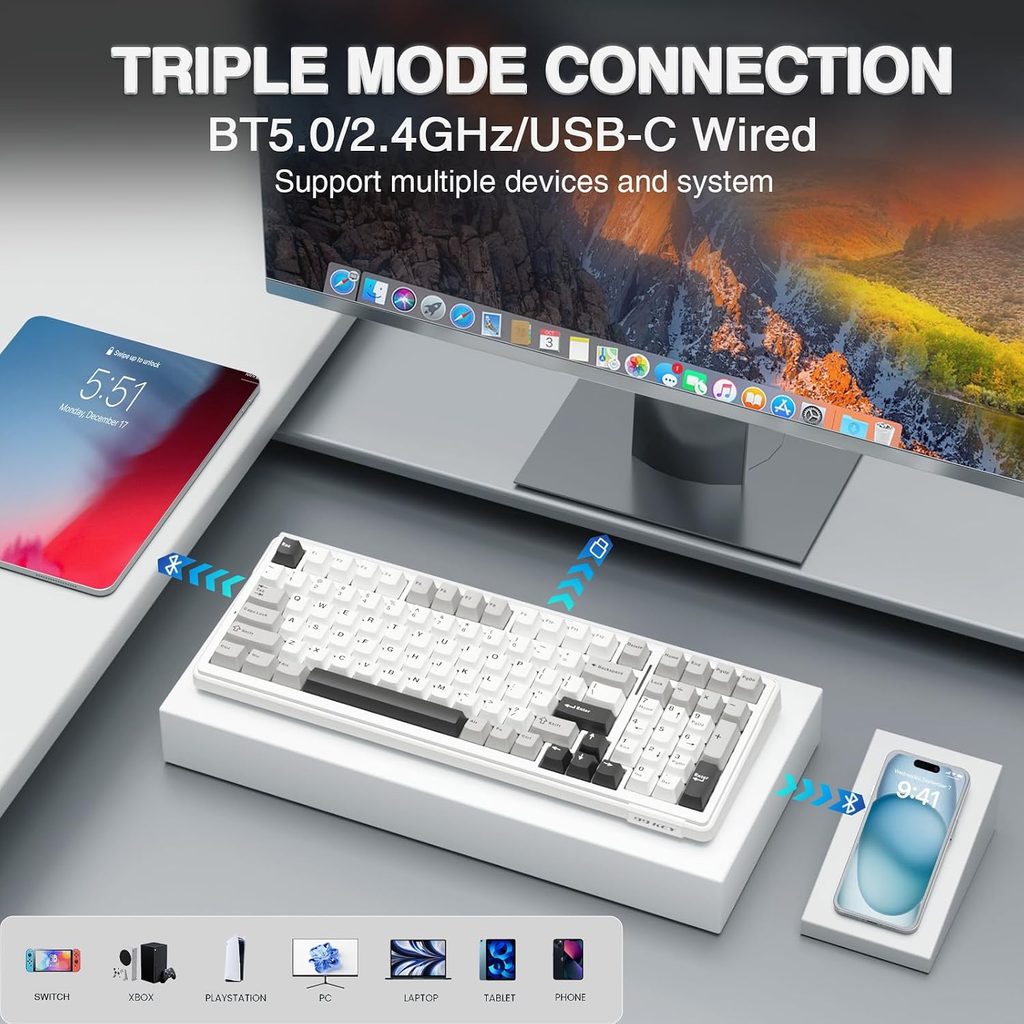
- Bluetooth 5.0, 2.4GHz wireless, and USB-C wired connectivity.
- Hot-swappable PCB supports compatible 3-pin and 5-pin switches.
- Gasket-mounted construction with five layers of sound-dampening material.
- 8000mAh rechargeable battery and customizable RGB lighting.
- Double-shot PBT keycaps.
Cons
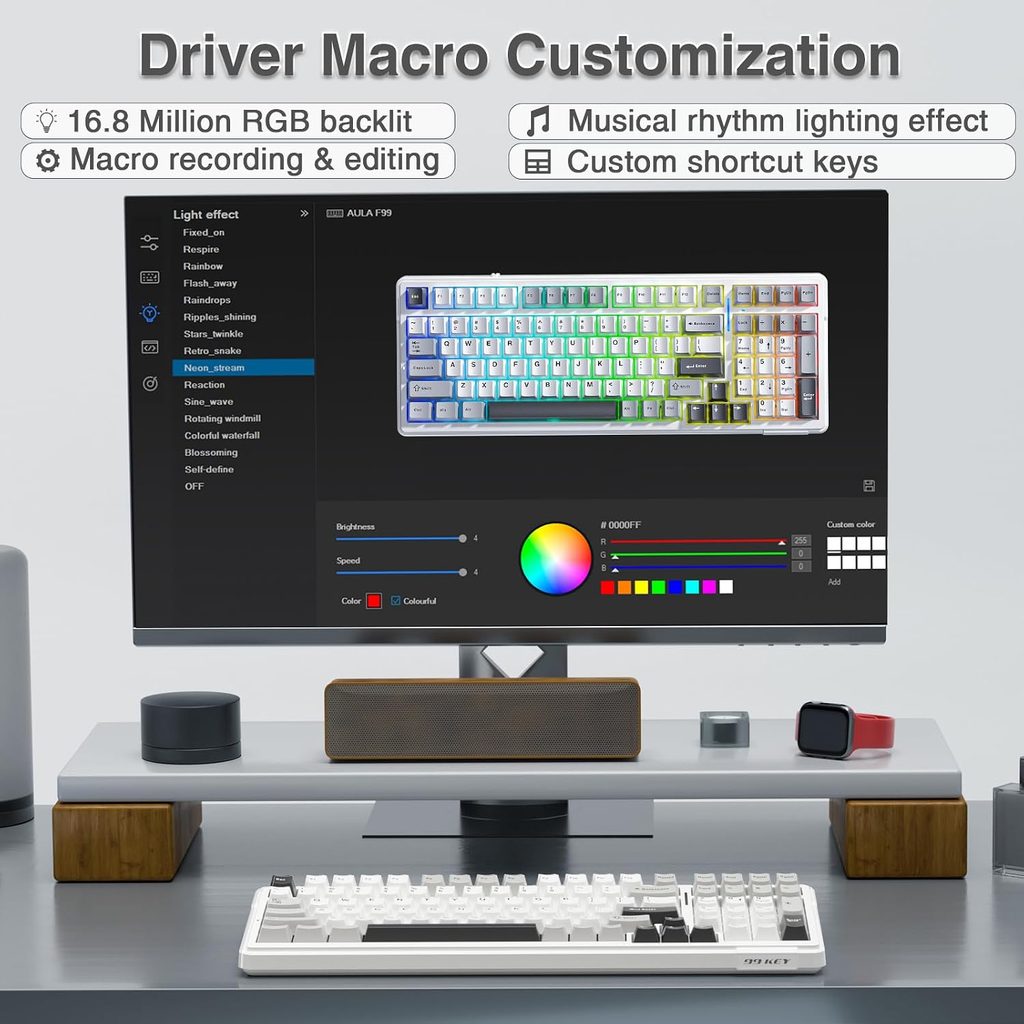
- Companion software may be frustrating for advanced remapping and macros.
- One supplied customer review reported occasional 2.4GHz input lag.
- The compact layout may take adjustment if you’re used to a standard full-size keyboard.
- Wireless performance can depend on the receiver’s location and the surrounding setup.
Key Features That Matter
1. Three connection modes for a flexible setup
The AULA F99 supports Bluetooth 5.0, 2.4GHz wireless, and USB-C wired connections. This gives you flexibility to choose between a cable-free desk, a dedicated wireless receiver, or a wired connection.
The supplied product information also describes support for up to five devices. That could be useful if you switch between a work laptop, personal computer, tablet, or other compatible device. Confirm the switching process and your specific device’s compatibility before buying.
One customer praised switching between a work laptop and personal desktop, while another reported occasional input lag with the 2.4GHz receiver plugged into the back of a PC tower. Receiver placement is worth considering: a USB extension cable may help bring the receiver closer to the keyboard, though it cannot guarantee a fix for every connection problem.
2. Hot-swappable switches and a gasket-mounted structure
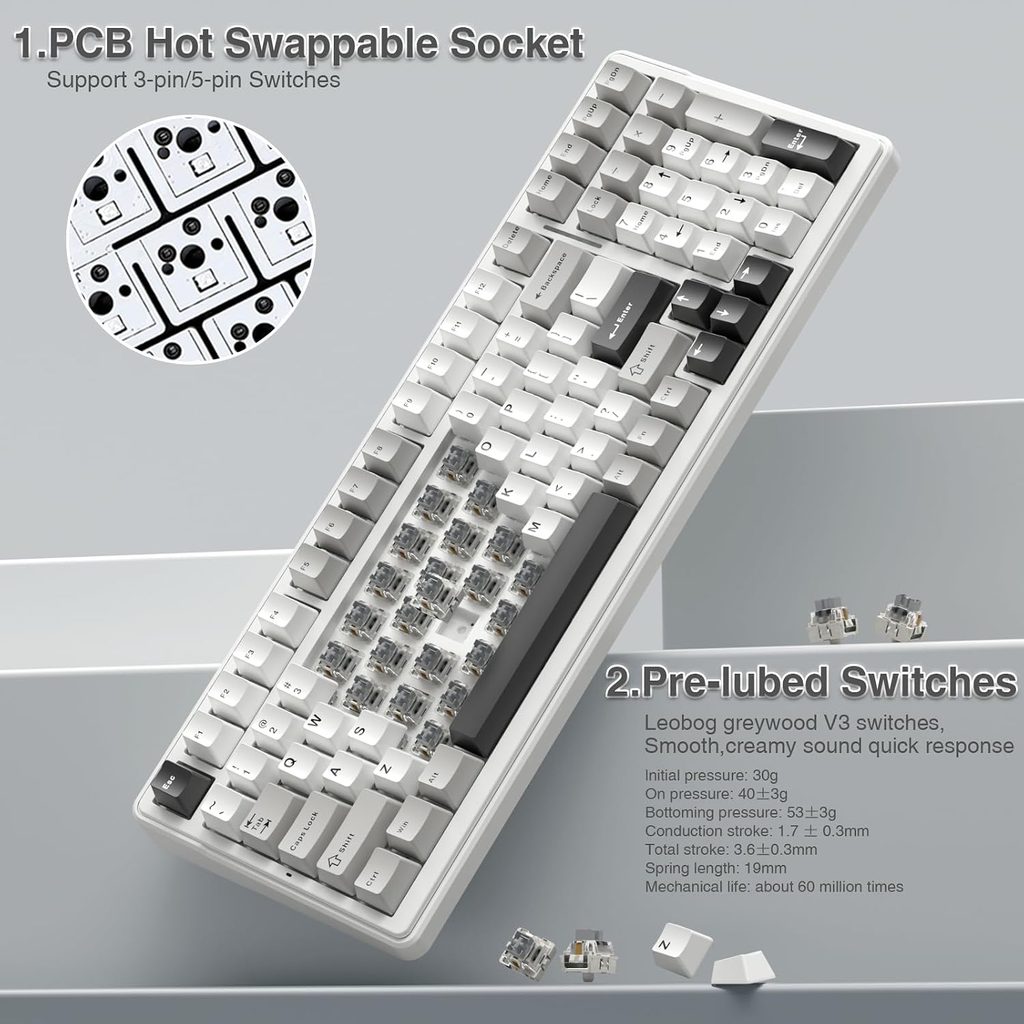
The keyboard’s hot-swappable PCB allows compatible 3-pin or 5-pin mechanical switches to be replaced without soldering. This makes the F99 more adaptable than a keyboard with permanently soldered switches, particularly for users who want to experiment with different typing feels later.
Its gasket-mounted construction and five layers of sound-dampening material are designed to soften the typing experience and reduce unwanted internal noise. The supplied customer feedback includes praise for the smooth feel of the pre-lubed linear switches and the satisfying sound straight out of the box.
Sound remains subjective, however. The switches, desk surface, keypress style, and room acoustics can all affect how a keyboard sounds in practice.
3. A compact layout that keeps the number pad
The 96% layout packs 99 keys into a smaller footprint than many traditional full-size keyboards while retaining the dedicated number pad. This is useful for spreadsheet work, data entry, budgeting, and other tasks where number keys matter.
For a creator workspace, the smaller footprint can also leave more room for a mouse, drawing tablet, or other desk accessories. If you rarely use a number pad and want maximum mouse space, a smaller 75% keyboard may be a better fit.
4. RGB lighting, PBT keycaps, and a large battery
The F99 includes 16 RGB lighting modes, with music-rhythm effects available through its software. Its double-shot PBT keycaps are designed for durability, while the advertised 8000mAh battery supports wireless use without requiring a permanent cable connection.
Actual battery life will depend on factors such as lighting brightness, connection mode, and usage. The supplied details do not establish a specific runtime, so it’s best not to assume a particular number of days or weeks between charges.
Specifications
| Feature | Details |
|---|---|
| Brand / Model | AULA F99 |
| Price provided | $68.99 |
| Layout | 96%, 99 keys |
| Connectivity | Bluetooth 5.0, 2.4GHz wireless, USB-C wired |
| Switches | Pre-lubed linear switches |
| Hot-swappable | Compatible 3-pin and 5-pin switches |
| Structure | Gasket mount with five-layer sound dampening |
| Keycaps | Double-shot PBT |
| Battery | 8000mAh rechargeable |
| Dimensions | 15.35 × 5.75 × 1.65 inches |
| Lighting | RGB, 16 modes |
| Compatibility | PC, Mac, tablets, smartphones, PS, and Xbox, subject to device support |
What Do Customer Reviews Tell Us?
The supplied customer reviews highlight three areas to weigh before purchasing:
- Typing feel: A five-star reviewer praised the smooth linear switches, satisfying sound, and ability to switch between computers. This supports the keyboard’s appeal for buyers who value the typing experience alongside appearance.
- Customization: A three-star reviewer liked the hardware and lighting but found the companion software difficult when configuring macros and remapping keys. If you plan to customize many shortcuts, software usability should be part of your decision.
- Wireless reliability: A one-star reviewer experienced occasional input lag with the 2.4GHz receiver positioned at the back of a desktop tower. This suggests receiver placement may matter in some setups, although the supplied review alone cannot establish how common the issue is.
Overall, the feedback points to a keyboard whose hardware features attract buyers, with software learning and wireless setup being the main practical considerations.
Is the AULA F99 a Good Fit for Your Workspace?
The AULA F99 is worth considering if you want a mechanical keyboard that can handle office work and gaming, keep a number pad, and connect to several devices. Its hot-swappable switches also offer a path to customization without requiring soldering skills.
It may be less suitable if you want a completely effortless software experience, need a guaranteed wireless connection in a challenging setup, or prefer a smaller keyboard without a number pad.
If you’re comparing compact mechanical keyboards, our EPOMAKER x AULA F75 Mechanical Keyboard review can help you evaluate a smaller-layout alternative.
Check the AULA F99 Wireless Mechanical Keyboard on Amazon
Frequently Asked Questions
1. Can you change the switches on the AULA F99?
Yes. The keyboard is described as hot-swappable and supports compatible 3-pin and 5-pin mechanical switches. Check switch compatibility before purchasing replacements.
2. Can the AULA F99 connect to multiple devices?
It supports Bluetooth 5.0, 2.4GHz wireless, and USB-C wired connectivity. The supplied information describes support for up to five devices, although the available connection modes and switching process depend on the setup.
3. Is the AULA F99 suitable for office work?
Yes, its compact layout retains a number pad, and its three connection modes suit a range of workstations. RGB lighting and gaming features are optional benefits rather than requirements for office use. Consider the keyboard’s dimensions, typing feel, and software before deciding.
Conclusion
The AULA F99 Wireless Mechanical Keyboard combines useful everyday features with room for customization. Its 99-key layout, tri-mode connectivity, hot-swappable switches, gasket-mounted construction, and large battery make it a strong candidate for buyers seeking more than a basic office keyboard.
At $68.99, its appeal depends on what matters most to you. If you want a compact keyboard that retains a number pad and offers wireless flexibility, the F99 deserves a place on your shortlist. If you prioritize simple software or a smaller footprint, compare alternatives before making your choice.
Affiliate disclosure: Crokabay may earn a commission from qualifying purchases made through links in this article, at no additional cost to you.
Editorial note: This article is based on the supplied product information and customer-review excerpts. Crokabay has not independently tested this product. Confirm current specifications, compatibility, price, and availability on the product listing before purchasing.