The VVB 14-in-1 USB-C Dock turns a compatible laptop’s USB-C or Thunderbolt port into a more complete workstation connection. Priced at $49.99, it combines multiple USB ports, HDMI and DisplayPort outputs, Gigabit Ethernet, SD and TF card readers, and pass-through charging in one compact hub.
For remote workers, designers, students, and creators who connect several accessories to their laptops, this docking station could reduce cable clutter and make a desk setup more convenient. However, display compatibility and your laptop’s USB-C port capabilities are important considerations.
The Bottom Line
The VVB 14-in-1 USB-C Dock offers an extensive selection of connections for a $49.99 multiport adapter. It is particularly appealing for compatible Windows laptops that need multiple displays, wired internet, and peripheral connections. Mac users should pay attention to the stated display limitations, and anyone considering it should verify their laptop’s USB-C capabilities before buying.
What We Like and What Could Be Better
Pros
- Broad selection of ports in one adapter.
- Two HDMI outputs and one DisplayPort output.
- Up to 87W pass-through charging to the connected laptop when supplied with compatible power.
- Gigabit Ethernet for wired networking.
- SD and MicroSD card readers for compatible memory cards.
- High-speed USB ports rated up to 10Gbps.
Cons
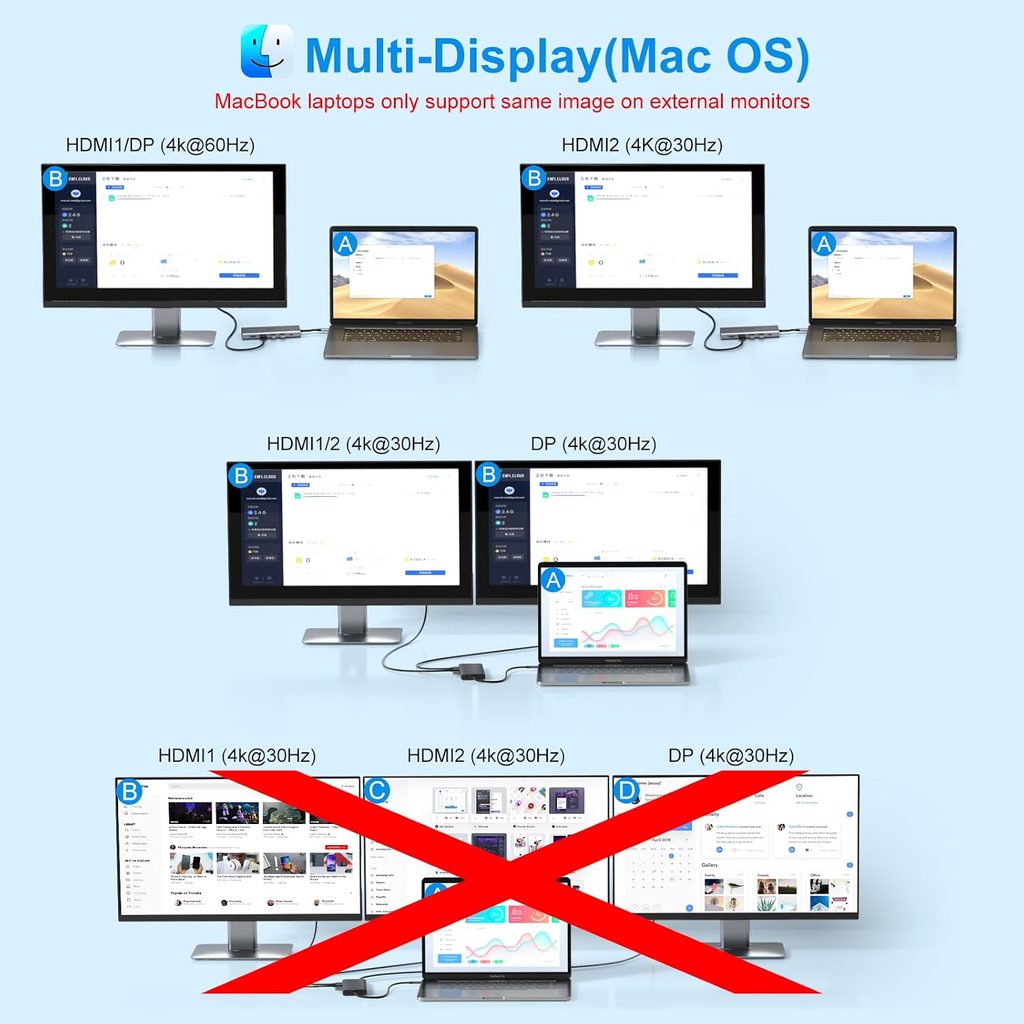
- External display behavior differs between Windows and macOS.
- Some laptop USB-C ports support data only and cannot provide the required video output.
- The number of advertised ports does not guarantee every port can operate at its maximum capability simultaneously.
Key Features That Matter
Multiple display connections
The dock includes two HDMI outputs and one DisplayPort output, giving compatible Windows laptops several ways to connect external monitors. The supplied product details state support for dual 4K displays and triple-display configurations, though the achievable resolution and refresh rate depend on the laptop, operating system, and display arrangement.
This can be useful for designers working across multiple applications, analysts managing several windows, or remote workers who want a dedicated monitor for meetings and another for daily tasks.
Important for Mac users: The product information states that macOS supports mirrored output across the external displays rather than independent extended desktops through this dock. If your workflow depends on separate content on multiple external screens, confirm compatibility for your exact Mac model before purchasing.
A wide range of ports
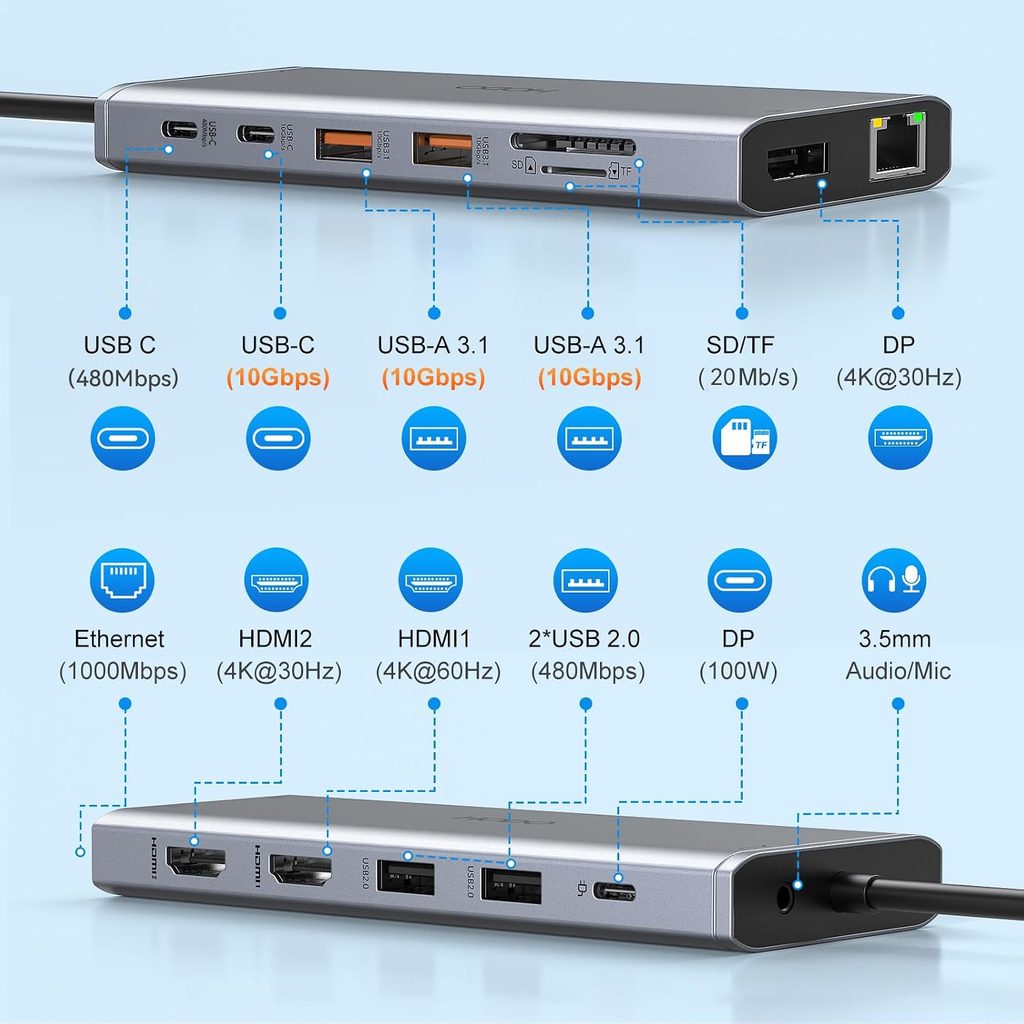
The 14-in-1 design combines ports for displays, USB accessories, networking, and memory cards. Instead of connecting a separate adapter for every device, you can potentially run your keyboard, mouse, storage devices, wired network, and monitors through one laptop connection.
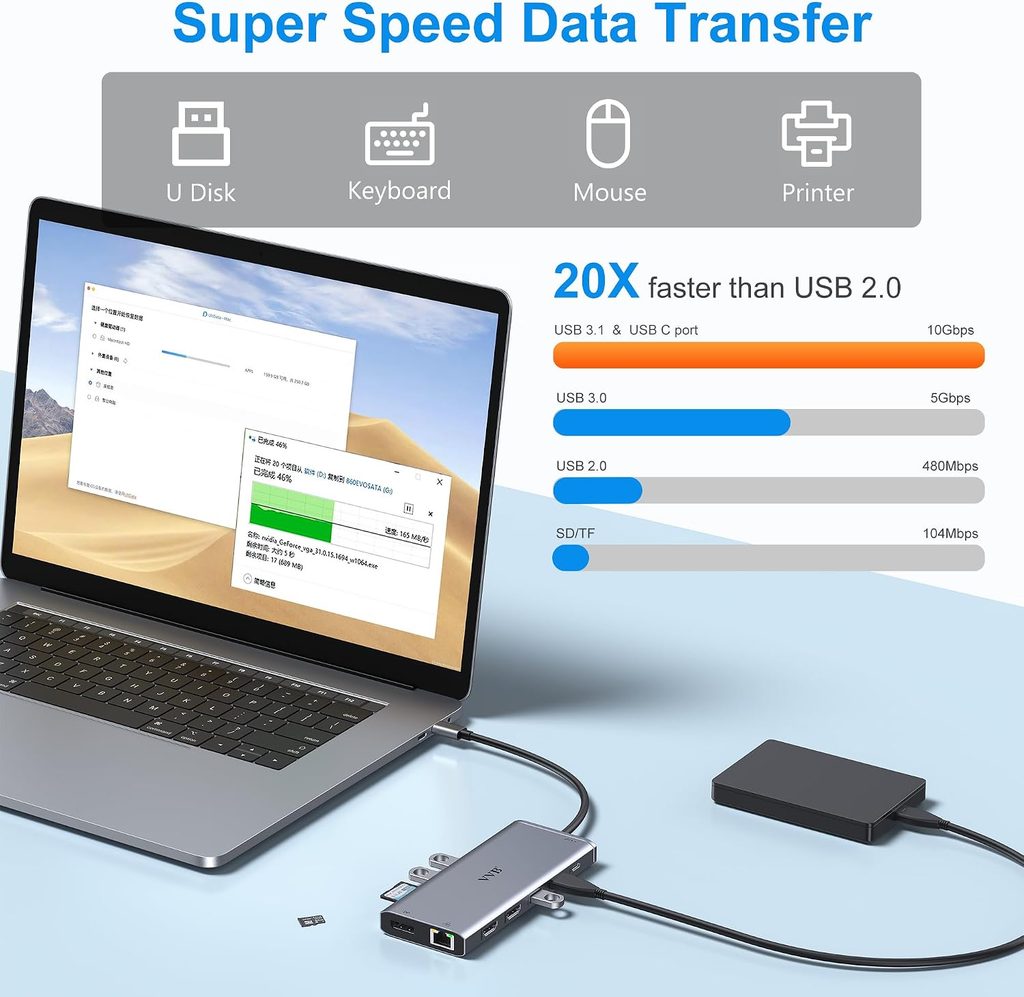
The hub includes USB-A and USB-C data ports with different speed ratings. Faster ports are suited to compatible high-speed storage and data accessories, while USB 2.0 ports can handle everyday peripherals such as a mouse or keyboard.
Pass-through power delivery
The dock has a USB-C Power Delivery input rated up to 100W, with up to 87W passed through to the host laptop according to the supplied specifications. This can help keep a compatible laptop charged while other accessories are connected.
The dock’s input rating is not the same as the power delivered to your laptop. Actual charging also depends on the power adapter, connected devices, and laptop requirements. Check whether your existing charger is suitable.
Ethernet and memory card readers
The Gigabit Ethernet port offers a wired networking option for users who prefer a physical connection over Wi-Fi. The built-in SD and TF card slots can also be useful for transferring files from cameras and other compatible devices.
For content creators, these connections may reduce the number of separate adapters needed to move footage, connect equipment, or work at a desk.
VVB 14-in-1 USB-C Dock Specifications
| Specification | Details |
|---|---|
| Brand | VVB |
| Port count | 14-in-1 |
| Video outputs | 2 × HDMI, 1 × DisplayPort |
| Stated display support | Dual 4K and triple-display configurations on compatible Windows systems |
| High-speed USB | 2 × USB-A 3.1 and 1 × USB-C, rated up to 10Gbps |
| Additional USB | 2 × USB-A 2.0 and 1 × USB-C 2.0 |
| Power delivery | 100W PD input; up to 87W laptop pass-through |
| Network | Gigabit Ethernet, up to 1Gbps |
| Card readers | SD and MicroSD (TF) |
| Audio | 3.5mm audio/microphone jack |
| Compatibility | Compatible Thunderbolt or full-featured USB-C laptops |
| Price provided | $49.99 |
Compatibility check before buying: Your laptop’s USB-C port must support video output, such as DisplayPort Alt Mode, or use a compatible Thunderbolt connection. A USB-C port that supports only basic data transfer will not provide the advertised monitor functionality. Also confirm the display configuration supported by your particular laptop and operating system.
What Do Customer Reviews Tell Us?
The supplied customer reviews highlight both the dock’s usefulness and the importance of checking compatibility.
A useful connection hub for Windows setups. One five-star reviewer reported connecting a Lenovo laptop to two external monitors successfully and appreciated having Ethernet and additional USB connections available through one cable.
Mac display behavior needs attention. A three-star reviewer praised the port selection and build quality but highlighted the mirrored-display limitation described in the product information. This matters if your work requires separate desktop spaces across multiple external monitors.
Not every USB-C port supports video. A one-star reviewer reported that the dock’s display outputs did not work with a laptop whose USB-C port supported only basic data transfer. This is a compatibility issue worth checking before ordering, not something to assume the dock itself can overcome.
These are individual customer experiences, but they reinforce a practical buying rule: check your laptop’s port specifications first, particularly if you plan to use multiple monitors.
Who Should Consider This Dock?
The VVB 14-in-1 USB-C Dock is worth considering if you want to expand a compatible laptop into a more connected desk setup without buying several separate adapters.
It may suit:
- Remote workers who need monitors, a keyboard, a mouse, and wired internet.
- Designers and creators who connect external displays and transfer files from memory cards.
- Students and professionals who want to keep frequently used accessories connected to one hub.
It may be a poor fit if your laptop lacks video-capable USB-C or Thunderbolt connectivity, or if you need independent extended desktops on macOS through this specific dock.
For an alternative with a more compact port selection, you can also compare it with a USB-C hub from an established accessory brand. Satechi 7-in-1 USB-C Hub Pro Slim.
More desk setup recommendations: HUANUO Dual Monitor Arm review — a complementary accessory for building a dual-monitor workstation.
Frequently Asked Questions
1. Can the VVB 14-in-1 USB-C Dock run two external monitors?
The supplied product information states support for dual 4K displays on compatible systems. Actual resolution, refresh rate, and independent display support depend on your laptop’s hardware, operating system, and configuration.
2. Will it work with any laptop that has USB-C?
No. The USB-C port must support the functions you need, especially video output and charging. A port limited to basic data transfer will not necessarily support the dock’s display outputs. Check your laptop manufacturer’s specifications before buying.
3. Does the dock charge a laptop?
It supports up to 100W USB-C PD input and up to 87W pass-through charging to the laptop, according to the supplied specifications. You will need a compatible power adapter, and actual charging performance depends on your laptop and connected devices.
Conclusion
The VVB 14-in-1 USB-C Dock offers a versatile collection of monitor, USB, networking, memory-card, and charging connections at a listed price of $49.99. For a compatible Windows laptop, it could simplify a desk setup by bringing several connections together through one hub.
Its main limitation is compatibility. Confirm that your laptop supports video output over USB-C or Thunderbolt, and pay particular attention to macOS display behavior if you use a Mac. With those checks completed, the VVB dock is a practical option to compare when building a more connected workspace.
Affiliate disclosure: Crokabay may earn a commission if you purchase through links in this article, at no additional cost to you.
Editorial note: This review is based on the supplied product information and customer review excerpts. Crokabay has not independently tested this product.